Aliya: A Handwritten Typeface for Elevated Web Design
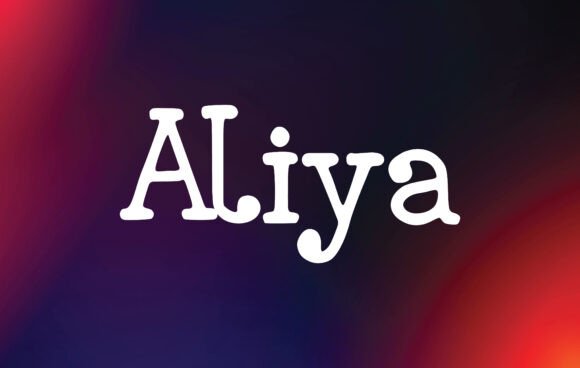
In the world of digital product creation, typography is rarely just about reading; it is about feeling. As a web designer who spends hours tweaking kerning and adjusting line heights, I have learned that the right typeface can transform a sterile layout into an immersive brand experience. This is where Aliya, a lovely and beautiful handwritten font from Script Amp, steps in to change the game. It is not merely a decorative element but a strategic design asset with the potential to take your creative ideas to the highest level.
When we talk about modern typography, we often prioritize speed and legibility above all else. However, there are moments when a brand needs to whisper rather than shout. Aliya provides that human touch. Its script-like qualities bring warmth and personality to websites, landing pages, and app screens, creating an immediate emotional connection with users before they even read the body copy. For digital creators looking to build a consistent online identity, this font offers a unique blend of elegance and approachability.
The Visual Personality of Aliya in Digital Layouts
Aliya is best described as a creative font that balances artistic flair with functional clarity. Unlike overly ornate calligraphy that struggles on small mobile screens, Aliya maintains a clean structure that ensures readability while still delivering that handcrafted aesthetic. The strokes vary naturally, mimicking the pressure of a real pen, which adds depth and character to text elements.
For UI designers, this visual rhythm is crucial. When used correctly, it breaks the monotony of standard sans-serif interfaces. Imagine a hero section on a SaaS founder’s landing page or a boutique online store. Instead of a rigid grid of blocky headers, Aliya introduces a sense of flow and movement. It guides the user’s eye through the content hierarchy, signaling importance without relying solely on size or color changes. The font’s inherent beauty makes it an excellent choice for branding, allowing logos and quotes to stand out with distinct character.
Strategic Applications Across Web Components
One of the most common mistakes designers make is overusing display fonts. To get the most out of Aliya, you must be selective about where it lives in your layout. It shines brightest when used as a supporting star rather than the lead actor in every scene. Here is how I recommend integrating it into various parts of a web project:
- Hero Sections and Headers: Use Aliya for main headlines on landing pages. It captures attention immediately and sets a premium tone. Pair it with a simple, neutral background to let the letterforms breathe.
- Call-to-Action (CTA) Areas: While buttons usually require high legibility, Aliya can work well on CTA banners or promotional strips where the action is secondary to the message. It adds a personal invitation rather than a robotic command.
- Quotes and Testimonials: This is perhaps the strongest use case. In editorial design and blog graphics, using Aliya for customer testimonials or inspirational quotes enhances trust and professionalism. It feels like a personal note from the founder.
- Digital Ads and Social Media Graphics: For marketers creating assets for Instagram or Facebook, Aliya elevates simple images. It turns a standard product photo into a branded moment, increasing engagement rates by adding visual interest.
- Course Pages and Portfolio Sites: Creative entrepreneurs selling digital products or showcasing their work benefit greatly from this font. It signals creativity and attention to detail, qualities that clients look for in a designer or educator.
Optimizing for Readability and User Experience
As web designers, our primary responsibility is usability. Even the most beautiful font fails if it cannot be read comfortably. Aliya performs exceptionally well on desktop monitors, but its performance on mobile devices requires careful consideration. On smaller screens, large blocks of handwritten text can become difficult to scan. Therefore, it is vital to use Aliya for short phrases, titles, and accents rather than long paragraphs.
Consider the context of dark backgrounds versus light backgrounds. Aliya’s contrast levels make it pop against soft pastels or deep navy blues, making it ideal for image overlays where white text might get lost. However, ensure there is sufficient padding and spacing around the letters. Tight tracking can make the handwritten style feel cluttered, reducing the perceived quality of the brand. By giving the font room to expand, you enhance the luxurious feel of the design.
Furthermore, think about conversion-focused layouts. If your goal is to drive sales or sign-ups, clarity is king. Use Aliya to highlight the value proposition or the final offer, then switch to a highly legible sans serif font for the details. This combination leverages the emotional pull of the script while maintaining the cognitive ease needed for decision-making.
Effective Font Pairing for Web Design
No font exists in isolation. To create a balanced typographic system, you need to pair Aliya with complementary typefaces. Since Aliya is a script font with strong personality, it pairs beautifully with minimalist sans serif fonts. A clean, geometric sans serif provides the necessary stability and neutrality that allows Aliya to shine without competing for attention.
For example, pairing Aliya with a modern sans serif creates a contemporary yet elegant digital identity suitable for fashion brands, wellness coaches, or lifestyle bloggers. If you are aiming for a more traditional or authoritative look, consider pairing it with a classic serif font. This combination works wonders for editorial design, luxury packaging design concepts, or high-end logo design projects. The key is contrast: let the script handle the emotion and the partner font handle the information.
Technical Considerations and Licensing
Before implementing Aliya into your client projects or personal websites, it is essential to check the included styles and file formats. Ensure you have access to the necessary weights for responsive design. While Aliya is primarily a display font, having variations allows for better scaling across different viewports. Additionally, verify webfont availability. Converting the font files properly ensures fast loading times, which is critical for SEO and user retention.
Another crucial aspect is commercial font licensing. Whether you are building a site for a local business, creating a digital template for sale, or designing assets for a global brand, you must adhere to the specific license terms provided by Script Amp. Commercial licenses typically cover web embedding, print materials, and social media graphics, but always double-check restrictions regarding resale or unlimited domain usage. Proper licensing protects your business and respects the creator’s intellectual property.
Conclusion
Aliya is more than just a pretty face in your design toolkit; it is a powerful tool for storytelling. By understanding its strengths and limitations, you can integrate it seamlessly into your web design workflow. Whether you are crafting a portfolio, launching an online store, or rebranding a service, Aliya helps convey a message of care, creativity, and professionalism. Embrace its handwritten charm to elevate your digital presence and connect with your audience on a deeper level.